

Coaches, studios & teams
Book for the student, pet or child, not just the parent
Keep each student, pet or dependent as their own profile under the parent or owner who books. Every appointment shows who it's for, and messages still go to the right contact.
Standard, Pro and Business. Turn it on in Settings › Features & add-ons.
How it works
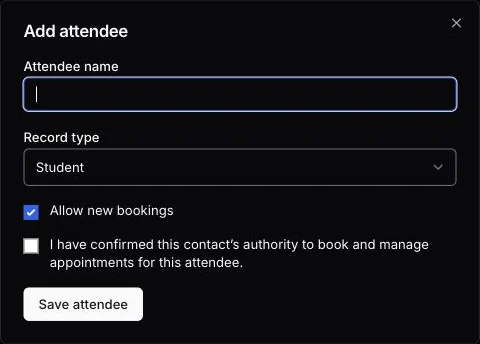
Add a linked profile
On the client's record, add a student, pet or dependent and confirm the contact is allowed to book for them.
Book for them
Staff pick the linked profile when booking. Signed-in clients choose who the appointment is for in the portal.
Keep the history together
Each profile has its own appointments. The parent or owner receives confirmations and reminders.
What’s included
- Student, pet and dependent profiles
- Booking authority confirmed by staff
- Choose who it's for in the client portal
- Separate appointment history per profile
- Archive to stop new bookings
Good to know
- Each linked profile has one booking contact. Multiple guardians aren't supported yet.
- Linked profiles don't get their own sign-in or messages.
Questions
Try Linked Client Profiles free for 14 days
Every new account starts with a 14-day Business trial. No credit card required.